WISPGate OSS & Inventory

Network Intelligence + Device Lifecycle + Warehouse Control

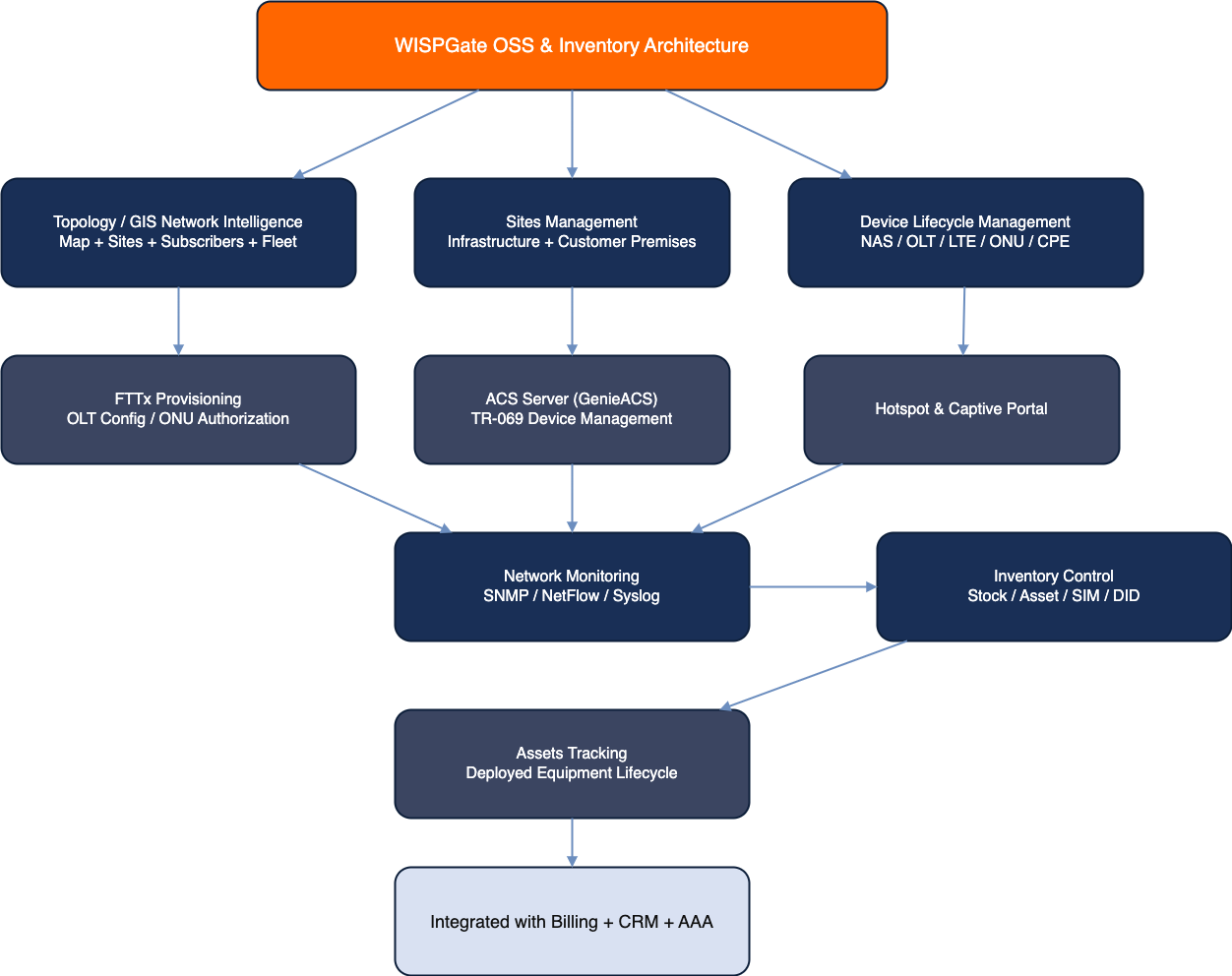
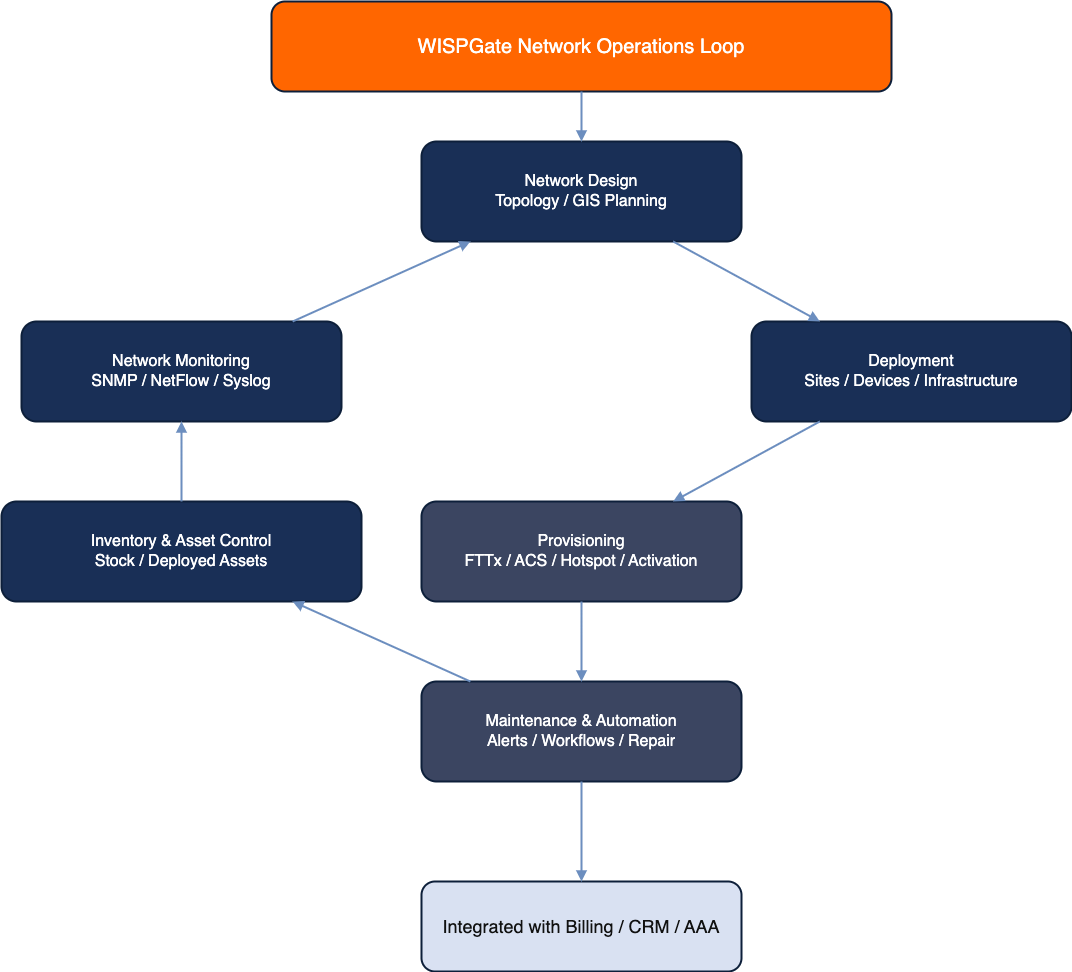
WISPGate’s OSS & Inventory modules are built to run a real operator: visualize the network, manage sites and devices, automate provisioning (FTTx + ACS), operate hotspot/captive portals, and monitor health via SNMP/NetFlow/Syslog β€” while keeping warehouse stock and deployed assets under tight control (including SIM/DID inventory for MNO/VoIP).
Below is the full module explanation with practical workflows and simple, standard diagrams.

Big Picture Architecture

OSS Inventory Architecture Network Operations Loop

Topology Module (GIS Map)

What it is

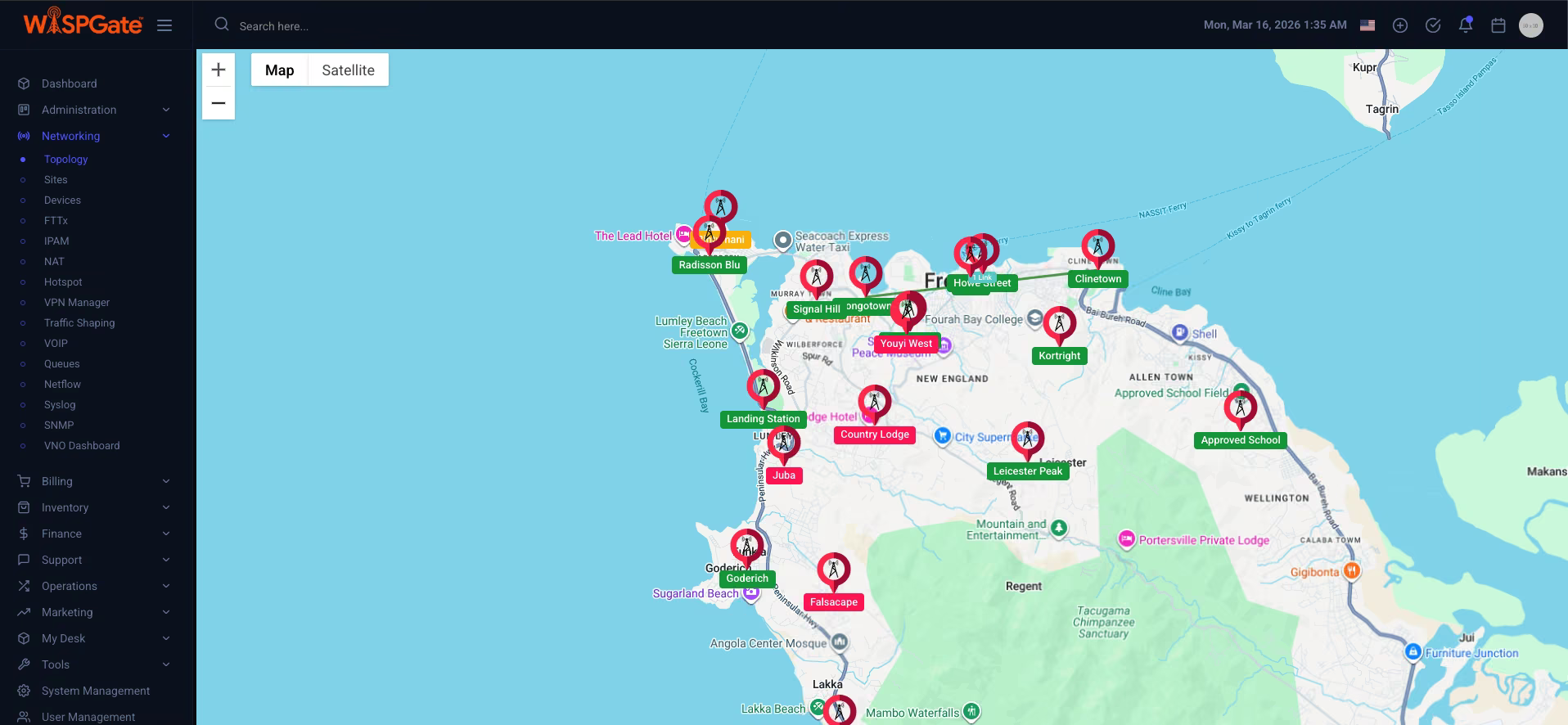
A GIS-driven topology map that visually tracks:

  • Network sites (PoPs, towers, OLT cabinets, core rooms, etc.)
  • Subscriber sites (buildings, apartments, enterprises, MDUs)
  • (Soon) Fleet and staff locations

Why it matters

Most operators run blind: spreadsheets + WhatsApp + β€œtribal knowledge.”

GIS topology turns operational chaos into location-aware accountability.
Topology workflow

Create Network Site (PoP/Tower)
↓
Add devices/links
↓
Create Subscriber Site
↓
Link subscriber/sub-service
↓
View on GIS map
↓
Filter by PoP/Region/Status
↓
Drill down to affected subscribers/devices
Topology Screenshot

Sites Module (Network + Subscriber)

What it is

A structured registry for all physical locations:

  • Network Sites: PoPs, towers, shelters, DC rooms, cabinets
  • Subscriber Sites: homes, MDUs, offices, compounds

Key capabilities

  • Region/PoP grouping
  • Coordinates / address / meta fields
  • Linking to devices, subscribers, and sub-services
  • Site-based filtering for ops and reporting

Site creation workflow

New Site
↓
Set type (Network/Subscriber)
↓
Set coordinates
↓
Assign region/PoP
↓
Attach devices (OLT/NAS/CPE/etc.)
↓
Link subscriber/sub-service (if subscriber site)

Device Module (Network + Subscriber Devices)

What it is

Comprehensive device management system covering:
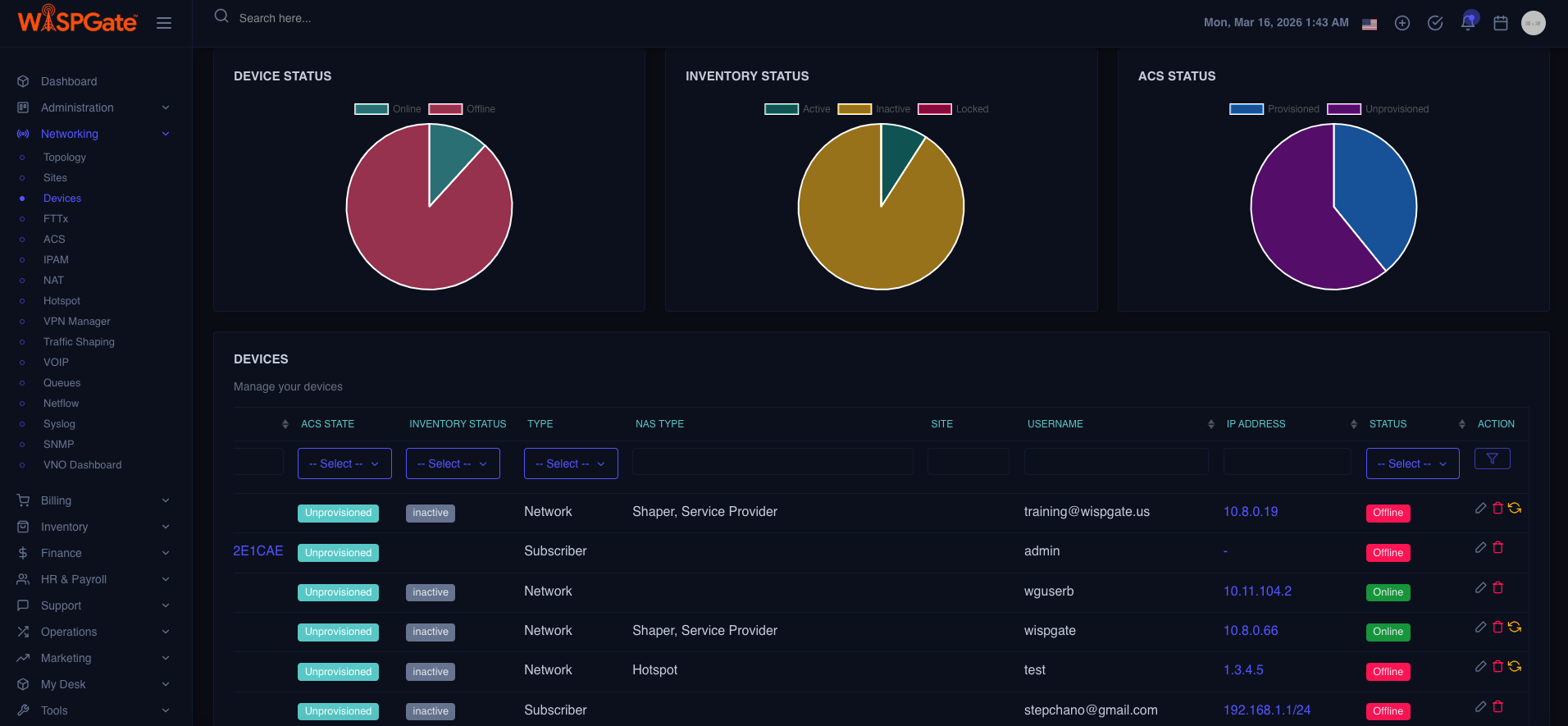
  • Network devices: NAS/BRAS, routers, switches, OLTs, LTE nodes, APs
  • Subscriber devices: ONU/ONT, wireless CPE, routers, VoIP ATA, STB

What makes it β€œoperator-grade”

  • Device inventory + operational status
  • Assignment: Stock β†’ Asset β†’ Deployed
  • Site binding (where the device is physically installed)
  • Subscriber/Sub-Service binding (who it serves)
  • Provisioning hooks (FTTx / ACS / Hotspot)
  • Monitoring hooks (SNMP/NetFlow/Syslog)

Device Lifecycle Diagram

                        [Stock Item] β†’ (assigned) β†’ [Asset] β†’ (installed at Site) β†’ [Deployed Device]
                            β”‚                        β”‚                  β”‚                     β”‚
                        Warehouse record     Ownership record     Location         Service impact context
                    

Device install workflow (MDU-friendly)

Pick device from Stock
↓
Convert to Asset
↓
Bind to Subscriber Site (Building/Apt)
↓
Attach to Sub-Service (Internet/IPTV/VoIP)
↓
Provision (FTTx/ACS)
↓
Monitor (SNMP/Syslog)
Device Page Screenshot

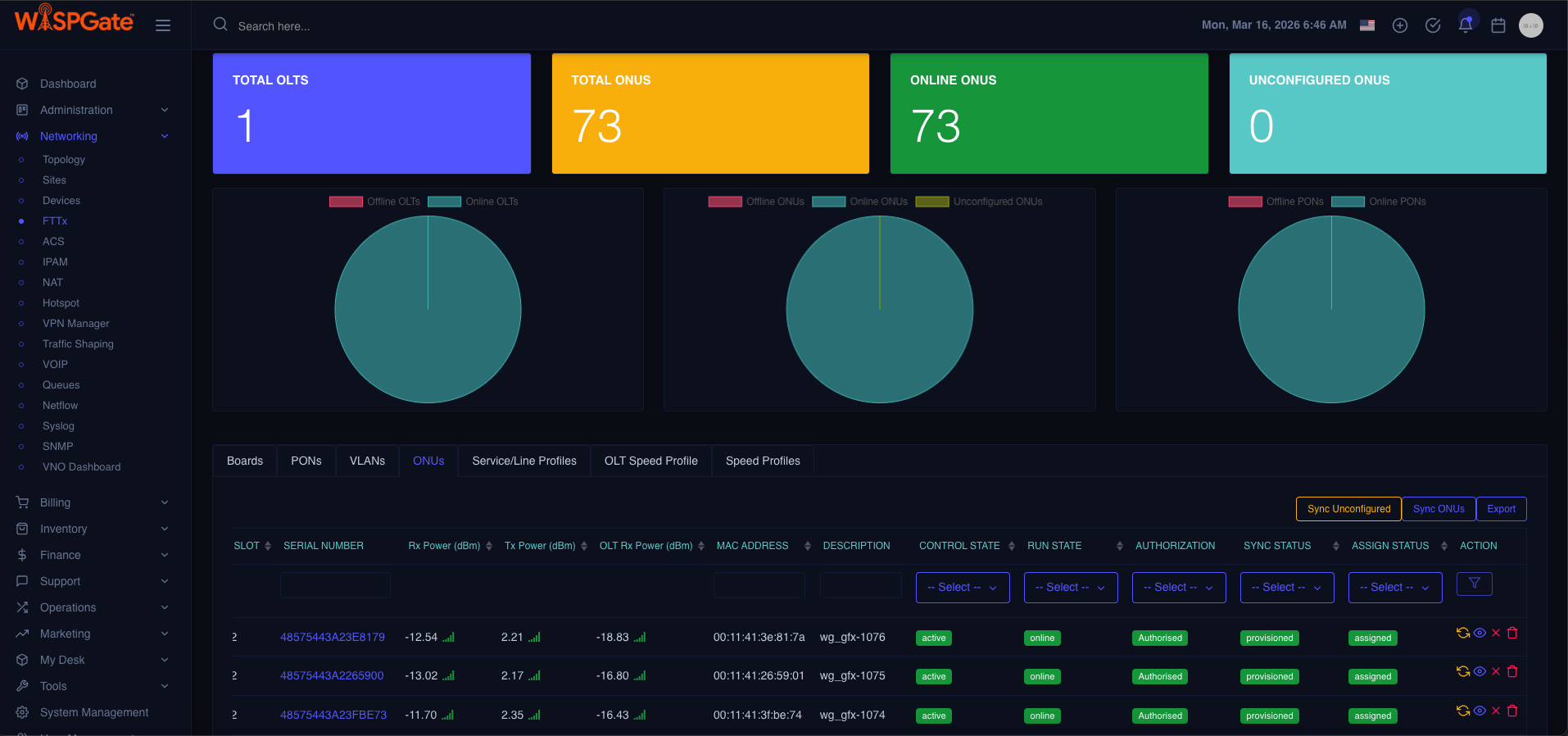
FTTx Module (OLT Management + ONU Provisioning)

What it is

A dedicated fiber access module to:

  • Manage OLT configuration
  • Handle ONU/ONT provisioning and authorization
  • Maintain subscriber-to-port/service mapping

Core operational outcomes

  • Faster activations
  • Less manual CLI work
  • Reduced misprovisioning (wrong VLAN/profile)
  • Clear mapping: OLT β†’ PON β†’ ONU β†’ Subscriber/Sub-Service

FTTx provisioning workflow

Create/Import OLT
β†’
Discover/Define PON ports
β†’
Register ONU (serial/LOID)
β†’
Authorize ONU
β†’
Assign profile (speed/VLAN/service)
β†’
Bind to Sub-Service
β†’
Confirm online state
β†’
Keep monitoring + auditing

Simple FTTx Topology Diagram

                            [OLT] ── PON ── [Splitter] ── [ONU/ONT] ── (Subscriber Sub-Service: Internet)
                        
FTTx Module Screenshot

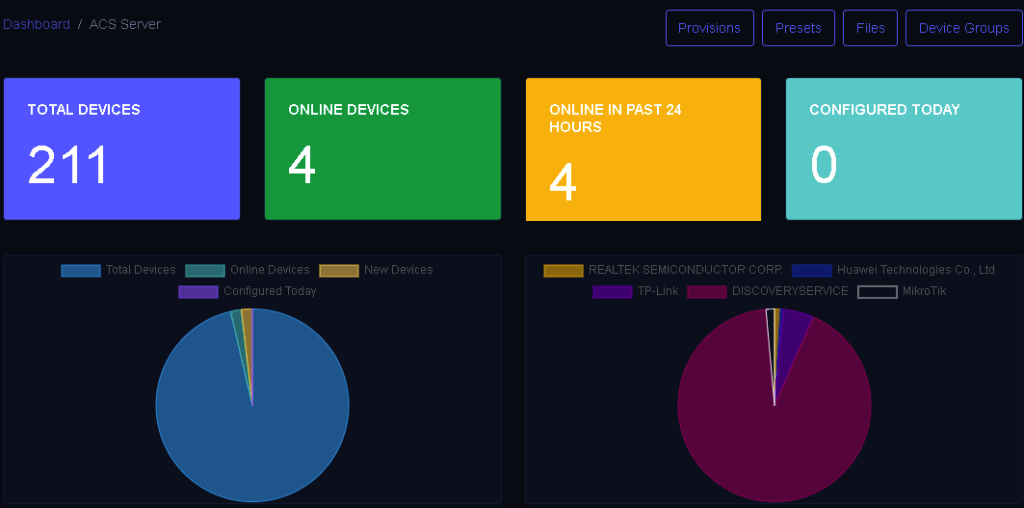
ACS Server (GenieACS backend + modern UI)

What it is

  • TR-069 ACS management using GenieACS as backend with a modern WISPGate UI.

What it enables

  • Remote provisioning
  • Parameter management (WiFi SSID, PPPoE creds, VLAN tags, etc.)
  • Firmware visibility (and typically firmware ops depending on implementation)
  • Device diagnostics without truck rolls

ACS management workflow

CPE connects to ACS
β†’
Device discovered
β†’
Bind device to subscriber/sub-service
β†’
Push configuration templates
β†’
Validate status
β†’
Ongoing parameter monitoring

ACS Architecture Diagram

                            [CPE/TR-069] ⇄ Internet ⇄ [GenieACS Backend] ⇄ [WISPGate UI + CRM/Billing context]
                        
ACS Management Screenshot

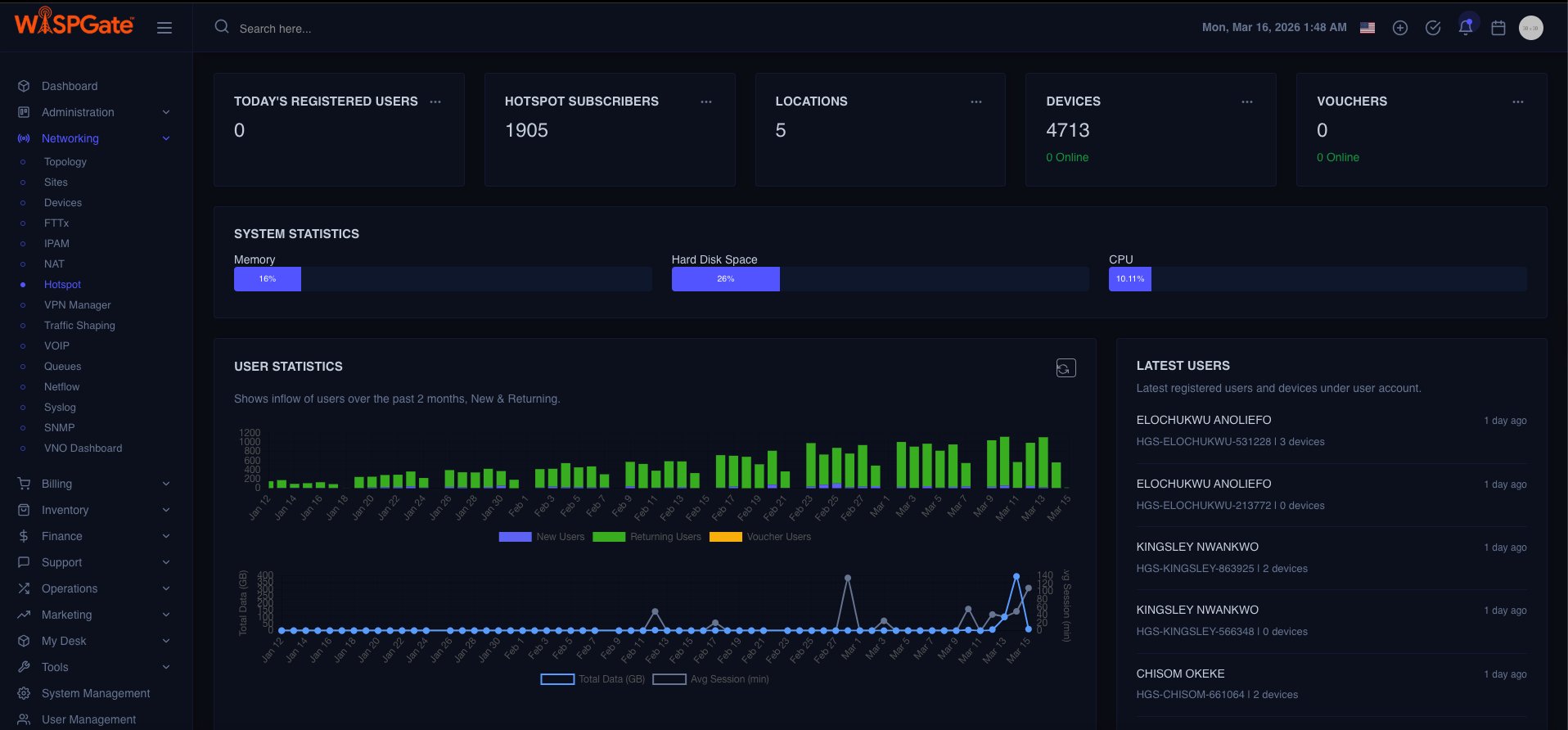
Hotspot & Captive Portal Module

What it is

A complete hotspot stack:

  • Captive portal experience
  • Voucher / user access methods (as configured in your product model)
  • Policy enforcement (time/data/speed rules depending on AAA integration)
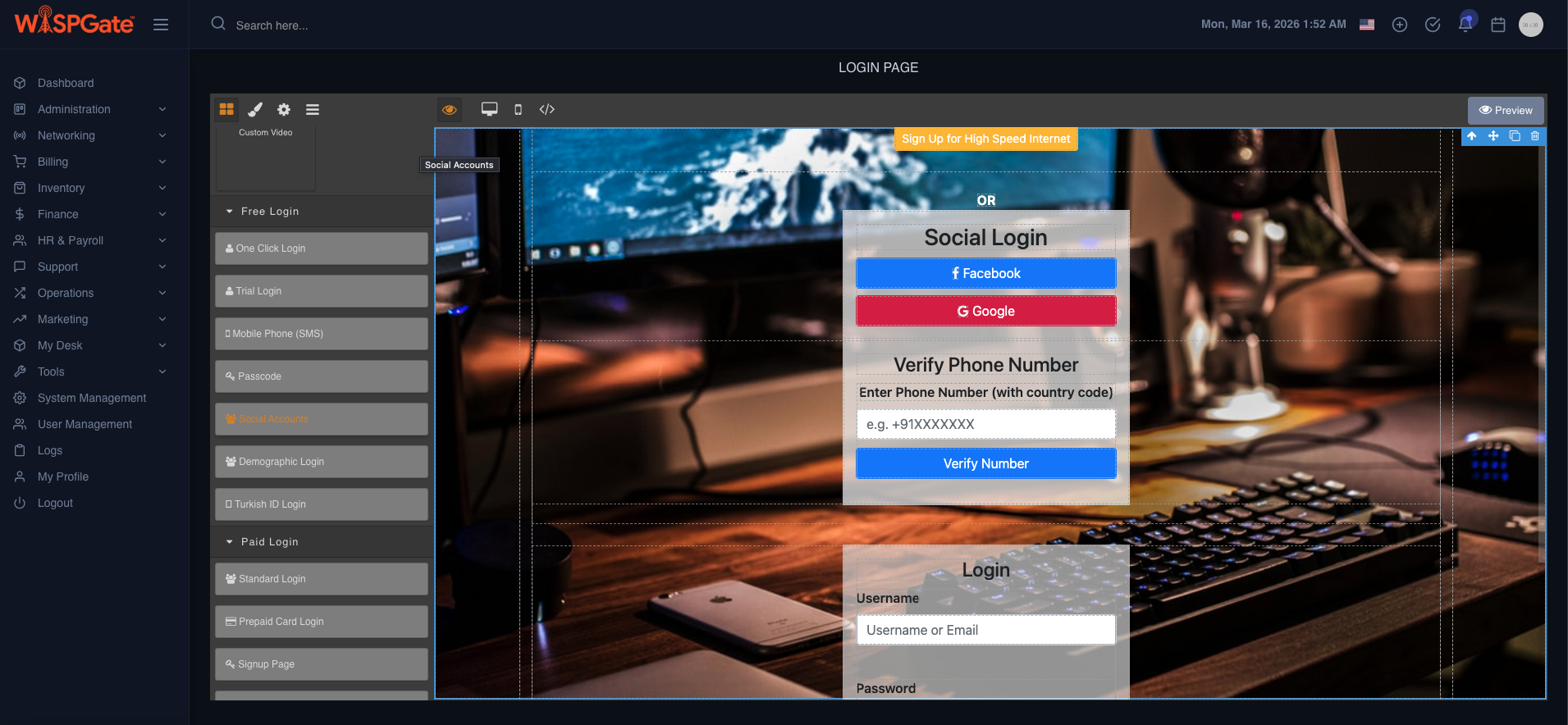
  • Branding and landing pages

Hotspot user workflow

User connects to SSID
β†’
Redirected to Captive Portal
β†’
Login/Voucher/Plan Selection
β†’
Access Granted
β†’
Session Tracked
β†’
Expiry/Limit Enforcement
β†’
Disconnect/Re-auth

Hotspot Architecture Diagram

                            [User Device] β†’ [Hotspot AP/Gateway] β†’ (Redirect) β†’ [Captive Portal]
                                  β†˜ (Auth) β†’ [AAA/RADIUS + Policy]
                        
Hotspot Dashboard Screenshot
Splash Page Designer Screenshot

Monitoring: SNMP Sensors + NetFlow + Syslog

What it is

Multi-signal monitoring layer:

  • SNMP: device health metrics (CPU, memory, interface status, signal, temps, etc.)
  • NetFlow: traffic visibility and flow analytics (who/what is consuming bandwidth)
  • Syslog: event logs, failures, auth events, interface flaps, security messages

Monitoring workflow (operational)

Collect telemetry (SNMP/Flow/Syslog)
↓
Normalize + map to device/site/subscriber
↓
Detect thresholds/anomalies
↓
Trigger alert/ticket (optional process)
↓
Investigate: drill down by Site/PoP/Device/Subscribers impacted

Monitoring Architecture Diagram

Devices
↓
SNMP / Flow / Syslog
↓
WG Monitoring Layer
↓
Dashboards / Alerts
↓
Ops Actions

Reality check:

Most systems show metrics but don’t tie it back to β€œwhich customers are affected.” Your advantage is linking monitoring objects to subscriber/sub-service context.

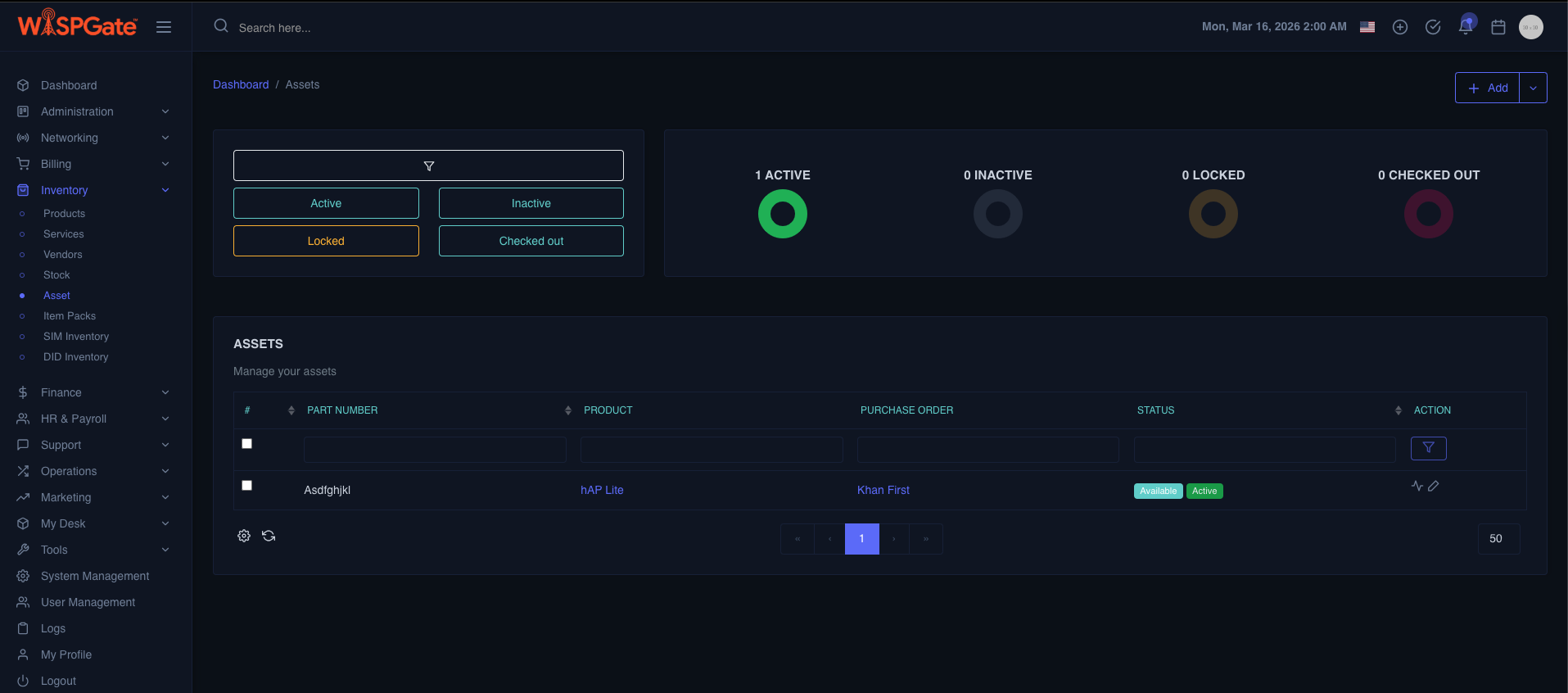
Inventory Management: Stock vs Assets

WISPGate inventory is split into two deliberate buckets:

Stock (Warehouse)

Represents:

  • Items available, ordered, reserved
  • Batches, suppliers, costs (as configured)
  • Warehouse locations

Stock workflow

Purchase/Receive
↓
Add to Stock
↓
Reserve for job/project/subscriber
↓
Dispatch
↓
Convert to Asset

Assets (Deployed / In-use)

Represents:

  • Items that are owned/controlled and actively used
  • Assigned to a subscriber/site/device record
  • Tracks lifecycle: deployed, replaced, returned, damaged

Asset workflow

From Stock
↓
Create Asset
↓
Assign to Site/Sub-Service/Subscriber
↓
Track status
↓
Replace/Return
↓
Back to Stock (if reusable) or Mark retired

Stock vs Asset Diagram

                        [Stock] (Warehouse)  ──issue/assign──>  [Asset] (Owned/Deployed)
                                ^                                       |
                                └── return/reuse (if applicable) <β”€β”€β”€β”€β”€β”€β”˜
                    
Stock & Asset Screenshot

SIM & DID Inventory (MNO + VoIP providers)

SIM Inventory

Tracks SIM lifecycle:

  • In stock / assigned / activated / suspended / retired
  • Link SIM to: subscriber, service/sub-service (e.g., LTE plan), device (e.g., LTE CPE)

DID Inventory

Tracks DIDs:

  • Available / reserved / assigned / ported / released
  • Link DID to:
    • subscriber
    • VoIP sub-service
    • routing or package logic (depending on implementation)

SIM/DID workflow

Add range/batch
β†’
Mark status
β†’
Reserve
β†’
Assign to subscriber/sub-service
β†’
Activate
β†’
Suspend/Recycle/Release (as policy)

End-to-End Operational Workflows

Workflow A: New subscriber installation (FTTx + CPE)

Create Subscriber Site (MDU building + unit)
↓
Create Sub-Service (Internet)
↓
Reserve ONU from Stock
↓
Create Asset
↓
Install at subscriber site
↓
Provision via FTTx (authorize ONU) + ACS (push CPE config)
↓
Device becomes β€œDeployed”
↓
Start monitoring SNMP/Syslog
↓
Ops-ready

Workflow B: Outage investigation (PoP impact)

Alert from SNMP/Syslog
↓
Open Topology
↓
Filter by PoP
↓
See affected Sites
↓
Drill into devices
↓
Identify failing link/OLT/NAS
↓
View impacted subscriber sub-services
↓
Notify/support workflow (process-defined)

Workflow C: Hardware replacement (asset control)

Ticket/Issue
↓
Locate subscriber sub service
↓
Identify attached CPE asset
↓
Mark old asset β€œfaulty/return”
↓
Allocate replacement from Stock
↓
Swap + reprovision (ACS/FTTx)
↓
Update asset bindings
↓
Close loop

Optimize Your OSS & Inventory

Book a guided walkthrough and see how WISPGate integrates GIS topology, device lifecycle tracking, and TR-069 ACS templates.

Explore the Architecture

Read about our centralized database design, security model, and flexible API layers.

PARTNER PROGRAM

Partner With WISPGate

OFFER CLAIM

Claim Your WISPGate Offer

Selected Offer: No offer selected
βœ“

Success

Your request has been submitted successfully.